September 15, 2023

The Evolution of Sitecore Development: Embracing SaaS, Front-End Expertise, and Cheese!

By: Craig Taylor
September 15, 2023


The Evolution of Sitecore Development: Embracing SaaS, Front-End Expertise, and Cheese!

Who Moved My Cheese?!

In the ever-evolving landscape of web development, platforms like Sitecore have played a pivotal role in shaping digital experiences. Traditionally, Sitecore development has relied heavily on backend (usually C#) developers to craft Sitecore solutions. However, with the advent of Sitecore XM Cloud and the shift towards a Software as a Service (SaaS) model, the dynamics of Sitecore development are undergoing a significant transformation. 

I often introduce myself as an architect that has a background in Microsoft technologies, specifically C# and Sitecore.  Moving the focus of Sitecore development towards frond-end technologies sounds like I'm putting myself and other backend devs out of work, but fear not, it doesn't have to be that way. I remember a time where people thought that the introduction of Visual Studio meant that the days were numbered for developers.  You may be thinking now that the same is true when we talk about the evolution of Sitecore development. (well, if you're a backend developer, that is)    

What does this shift mean for traditional, backend Sitecore developers, the increasing importance of frontend developers, and the shift towards a more collaborative, product-focused approach?  I'm glad you asked.

The Shift to Sitecore XM Cloud

  1. Embrace Cheese, I mean, SaaS for Scalability
    Sitecore XM Cloud represents a shift towards a cloud-based, scalable architecture. This move not only simplifies infrastructure management (aint nobody got time for that) but also opens new doors for collaboration between backend and frontend developers. The emphasis on SaaS allows for quicker deployment, reduced maintenance overhead, and a more seamless development process.

  2. The Rise of Front-End Development in Sitecore
    • React and Next.js Integration
      We are flipping staffing models from staffing a 'bunch' of backend developers along with a 'few' frontend developers on its head. As Sitecore (and partners) embrace a more API-first approach, the need for proficient frontend developers has become more pronounced. React and Next.js have become integral components in the Sitecore development toolkit and frontend developers now play a crucial role in shaping the user interface and optimizing the overall user experience.  We aren't forgetting about the backend devs as you will see below.

    • Enhanced Content Delivery
      With a focus on content delivery to the frontend, Sitecore developers are transitioning from being solely backend experts to becoming well-versed in frontend technologies. This shift not only empowers developers to create more interactive and dynamic user interfaces but also facilitates a more collaborative development environment.

The Changing Role of Sitecore Developers

  1. From Code-Centric to Product-Centric
    • Configuring Sitecore for Frontend Integration
      Sitecore developers are no longer just coders; they are becoming product experts who understand the intricacies of configuring Sitecore to seamlessly integrate with frontend technologies. This involves mastering the art of content organization, personalization, and API configurations to ensure a smooth flow of data between the backend and frontend.

    • Collaboration with Frontend Teams
      The lines between backend and frontend development are blurring, and collaboration is key. Sitecore developers now work hand-in-hand with frontend teams, providing them with the necessary tools and data structures to bring digital experiences to life. We can move away from 'The front-end devs have to understand and run Sitecore on their machines' fallacy.  Let's let front-end devs do what they do best.  Let's let Sitecore experts do what they do best.  Let's let them collaborate so they can build build great Sitecore sites. This collaboration fosters a more holistic approach to Sitecore development.

Embrace the Cheese, I mean, Change

The evolution of Sitecore development towards a SaaS model, particularly with Sitecore XM Cloud, marks a shift in the skills and expertise required to develop today's modern websites. While backend Sitecore developers will always be valuable, the demand for frontend developers with React and Next.js experience is on the rise. 

Sitecore developers are no longer confined to the backend; they are evolving into versatile product experts, bridging the gap between backend infrastructure and frontend innovation. We still need backend deveopers to help with the configuration of Sitecore, creation of Sitecore artifacts, devOps processes, integrations, search, gated content, etc. This transformation not only enhances the efficiency of development processes but also results in more dynamic and engaging digital experiences for end-users. 

As the world of Sitecore development continues to evolve, embracing this change is essential for staying at the forefront of digital innovation.

References:

Who Moved My Cheese (We had a training session early in my career where we discussed this book and it's always in my head and I wonder if people look at me like I'm crazy when I mention it.  The book is about embracing change. It talks about a mouse who is mad that his cheese has been moved and he can't let it go.  Instead of focusing on that, embrace the change and learn how to operate while your cheese is in a new location.  I hope this helps to explain why I keep referring to "cheese" in this post.)


November 1, 2019

Syncing TDS content with Sitecore and the Field Content Does Not Match Content-Length Error

By: Craig Taylor
November 1, 2019


Syncing TDS content with Sitecore and the Field Content Does Not Match Content-Length Error
So I recently ran into an issue on a new-to-me project.  The solution was already created, the project team had moved on to other projects and I was tasked with getting a new team ready to make some enhancements. While attempting to sync my Sitecore content with my local instance, I received a TDS error stating:

TDS Content Length Error


This is a known issue when working with TDS and git and the solution to correcting this has been provided earlier by others here and here.  In summary, the solution is to update the .gitattributes file by adding a line with the following:


This works great going forward, but doesn't address the issue you already have.  As both articles mention, the solution is to delete your local TDS files and re-sync.  For my situation, this doesn't work as I don't have the items in my local instance yet and deleting the items on disk would just lose them forever.

The solve is rather manual in nature, but here is what I did:

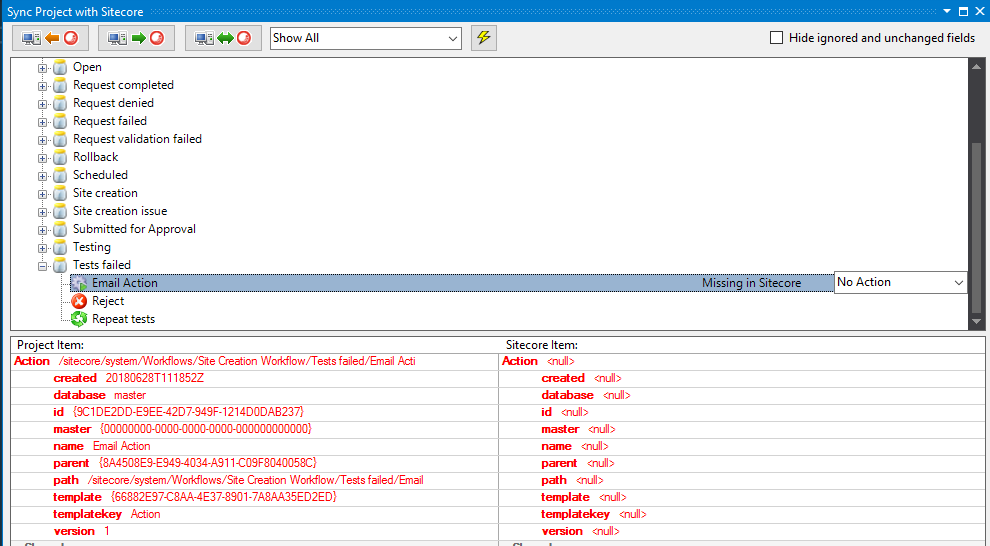
  1. Attempt to sync TDS with Sitecore and make note of all the items that have the error.  In my example, I'm only showing a single line, but you may have many. (as I did before I took this screenshot)

    TDS Sync View
  2. Open the .item file in a text editor.
  3. Take note of the template type of the item and create a new item in Sitecore with the same type. (making sure to create the item with the same name/path as in the item file)
  4. Copy the relevant fields from the .item file and paste them into the proper fields in your new Sitecore item.  In my case, I have an "Action" template item and only care about "Type", "Parameters" and "Security" fields. (Note: You don't have to worry about every field, but you should take care to bring over the important fields to your application.  You can usually ignore fields like "_sortorder", "__owner", "__created", etc.)

    Item View
  5. Save your Sitecore item.
  6. Sync your TDS item to Sitecore from Visual Studio.

Your error is now gone and you can continue on your way.  As mentioned, this can become an extremely tedious process depending on how many items and how many fields you have on your items, but in my case, was a necessary evil. Someone smarter than me could probably develop a script of some kind to address the error on a larger scale, but I'll leave that to the aforementioned smarter people.

References:

Deploying Sitecore Items with Git and TDS (Hans Léautaud from 2014): https://medium.com/sitecore-tips-tricks/deploying-sitecore-items-with-git-and-tds-f6a47605d1b4

Hedgehog TDS - Field Content Does Not Match Content-Length (Corey Smith from 2016): https://www.coreysmith.co/hedgehog-tds-field-content-does-not-match-content-length/

September 10, 2019

Sitecore Roles PaaS Solr Connectivity

By: Craig Taylor
September 10, 2019


Sitecore Roles PaaS Solr Connectivity

Here's a quick one for everyone.  I recently provisioned a full Sitecore XP 9.0.1 environment in Azure PaaS.  The only exception to this is a VM that is running Solr.  I was getting a lot of errors in Application Insights about xConnect not being able to connect to the Solr server.  I suspected that I was missing a hybrid connection somewhere, but wasn't sure which role was missing it.

I couldn't find a list from Sitecore's documentation of all the roles that need to access Solr.  I know that I could look for the "ContentSearch.Solr.ServiceBaseAddress" setting to find all references to my Solr server, so I downloaded all the config files from each Sitecore role and found the one I was missing (xConnect Search).  I added the hybrid connection to the Solr server to my xConnect Search App Service and was back to running with no exceptions again!

Note: The "ContentSearch.Solr.ServiceBaseAddress" setting was removed in Sitecore 9.0.2 and is now in the "solr.search" connection string.

For reference, here are the 5 roles that should be able to communicate with Solr:

  • Content Management
  • Content Delivery
  • Processing
  • Reporting
  • xConnect Search

April 12, 2019

Limit TreelistEx Selections to X Number of Items

By: Craig Taylor
April 12, 2019


Sitecore Item Limit

I recently had a requirement to limit the content author's ability to select items.  In this case, they were only allowed to select two items.  I love using "TreeListEx" and therefore selected that field type.  I knew that I could set validation on fields and went about looking for the built-in validator that would limit the number of selections. . . I didn't find it.

While I was surprised to not find this validator, I thought that surely, someone else smarter than me had mentioned it on the interwebs; I was not disappointed.  A quick search yielded a StackOverflow post about it that cited a blog post.  In summary, apply a Regex value to the "Validation" field of your field. (Add a helpful "ValidationText" message while you're at it.)

I dutifully copied and pasted the Regex expression into my field and was a little surprised to see an error message while testing the validator:

Sitecore Validation Error

Well, that didn't go as expected.  After a bit of Internet sleuthing on the error, I found that there might be a character (or "characters") in the string that needs to be escaped.  I simply changed "^({[^}]+}|?){0,2}$" to "^(\{[^}]+\}|\?){0,2}$" (included the escaping 'backslashes' before the curly brackets and question mark) and was on my way!


Sitecore Validation Working

Update: And of course as I'm finalizing the research for this post, I see that Ben *actually* did solve this and it can be seen in the screenshot he included, but the Regex text in his post didn't include the escape characters

November 27, 2018

Sitecore CD Hardening via Release Deployments

By: Craig Taylor
November 27, 2018


Sitecore CD Hardening via Release Deployments

Security hardening on your CD servers is an absolute must.  It should not be an afterthought and you should address it early so that you're not trying to cram it in just before go-live.

In the days before automated deployments, CD hardening would involve manually manipulating the IIS folder level permissions on each CD server in your environments. With automated deployments, we can make this much easier!

Which Sitecore Version are We Deploying?

Take note of which version of Sitecore you are working with.  Prior to Sitecore 8.2, Update 3, you are still limited to manipulating IIS folder level permissions.  You can also handle this with configuration, but that's outside the scope of this post.  With Sitecore 8.2, Update 3 and newer, we have the option of changing the forms authentication mode in order to secure the server.

Disable Forms Authentication

The simple way to disable access to your Sitecore interface is to change the authentication mode from "Forms" to "None" in your web.config:


Easy enough to do on each of your CD servers, right?  But we want to automate that with our deployments.

Azure Devops and Web.config Tranforms

Using a web.config transform, we can target the "authentication" node and change the value to "None." 

What about local development though? 

When developing locally, you can use the "Debug" solution configuration that lets the web.config use the "Forms" setting when developing locally. This is exactly how Sitecore ships out of the box.

Use the "Release" solution configuration to set a transform on that element to change it to a token value.  Note: This assumes you are using the "Release" configuration when building your solution in Azure Devops (was VSTS). 

Why a token value instead of just setting it to "None"? 

We are utilizing (mostly) clean deploys.  When deploying, we wipe the web root and install all of Sitecore and our custom code and configuration from scratch.  Additionally, we deploy the same set of files to every server.  Different values for the tokens are controlled via variables and variable groups in Azure Devops. We expect this token value to be replaced at the time the release is generated and deployed to our different environments.

Putting it Together

So, we have a Web.Release.config file in our solution that looks like this:


In Azure Devops, we have a Variable Group for our CM servers that has the same "#{AuthenticationMode}" token with a value of "Forms":

Sitecore CM Server Role Variables


Additionally, in Azure Devops, we have another Variable Group for our CD servers that has the "#{AuthenticationMode}" token with a value of "None":

Sitecore CD Server Role Variables


When the release is built, use the Replace Tokens task in your release definition to process all your config files and replace the tokens with values from your Azure Deveops Variables Library.

Summary

Security hardening is an important task that shouldn't be overlooked and shouldn't be pushed to the end of your development cycle.  Consider security early and keep yourself and your clients out of the news.

Additional Reading

Sitecore - Deny anonymous users access to a folder

Sitecore - Restrict access to the client

Visual Studio Marketplace - Replace Tokens Task

January 31, 2018

Craig Taylor Wins Sitecore "Most Valuable Professional" Award

By: Craig Taylor
January 31, 2018


Craig Taylor wins Sitecore Most Valuable Professional Award

Atlanta, GA — January, 31st, 2018 — Craig Taylor has been named a "Most Valuable Professional (MVP)" in the Technology category by Sitecore®, the global leader in experience management software. Craig was one of only 208 Technology MVPs worldwide to be named a Sitecore MVP this year.

Now it its 12th year, Sitecore's MVP program recognizes individual technology, strategy, and commerce advocates who share their Sitecore passion and expertise to offer positive customer experiences that drive business results. The Sitecore MVP Award recognizes the most active Sitecore experts from around the world who participate in online and offline communities to share their knowledge with other Sitecore partners and customers.

I'm truly honored that Sitecore recognized me as an MVP in the Sitecore community for the fifth straight year! I'm surrounded by some amazingly talented co-workers at Avanade and supported by an amazing Sitecore community. I feel like I'm in great company and am continually pressed to keep the high standards demonstrated by the other Sitecore MVPs. (Craig Taylor, Sitecore Architect, Avanade Inc.)

"The Sitecore MVP awards recognize and honor those individuals who make substantial contributions to our loyal community of partners and customers," said Pieter Brinkman, Sitecore Senior Director of Technical Marketing. "MVPs consistently set a standard of excellence by delivering technical chops, enthusiasm, and a commitment to giving back to the Sitecore community. They truly understand and deliver on the power of the Sitecore Experience Platform to create personalized brand experiences for their consumers, driving revenue and customer loyalty."

The Sitecore Experience Platform™ combines web content management, omnichannel digital delivery, insights into customer activity and engagement, and strategic digital marketing tools into a single, unified platform. Sitecore Experience Commerce™ 9, released in January 2018, is the only cloud-enabled platform that natively integrates content and commerce so brands can fully personalize and individualize the end-to-end shopping experience before, during, and after the transaction. Both platforms capture in real time every minute interaction—and intention—that customers and prospects have with a brand across digital and offline channels. The result is that Sitecore customers are able to use the platform to engage with prospects and customers in a highly personalized manner, earning long-term customer loyalty.

Craig is a five time Sitecore Technology MVP and is a skilled, senior IT professional with over sixteen years of professional experience in Web technologies. He is an expert in architecting and leading teams in delivering Sitecore CMS solutions. Craig has a consistent record of delivering successful software implementations that are on-time and on-budget.

More information can be found about the MVP Program on the Sitecore MVP site: http://www.sitecore.net/mvp

December 1, 2017

Errthing is Duplicated! (in the Sitecore content tree)

By: Craig Taylor
December 1, 2017


Errthing is Duplicated! (in the Sitecore content tree)

So many Sitecores!  I recently ran into something that I've never seen before.  After performing a build to my local server, I noticed that I was having trouble syncing portions of my content tree via TDS and Rocks.  After further investigation, I noted that every node was duplicated:

You get a content, you get a content, you get a content

No bueno.  The duplicated items had identical guids, so it's not like they were separate items.  This screenshot is from Rocks, but logging into Sitecore showed me the same thing. (8.2 Update 4, btw, but this probably applies to all versions of Sitecore)

I tried just about everything I could think of to resolve this.  No dice.  Off to the trusty Sitecore Slack channels for help!

Side note: The Sitecore community is awesome!  You've instantly got an army of Sitecore enthusiasts willing to help you through any roadblocks you may face.  At times it seems like there are so many places to keep track of, but when you need them, you're glad they're there.  How to connect with the community: https://sitecore.stackexchange.com/questions/1689/how-can-i-connect-with-the-sitecore-community

As I initially thought this might have something to do with TDS, I tried that channel first.  Using the suggestions by others on the channel I tried numerous IIS restarts, Visual Studio reboots, disabled the TDS item cache, removed TDS file caches and rebooted my VM.  None of these helped my situation.  I was starting to consider "nuclear" options where I would attach vanilla master database files and briefly considered "transferring items from web to master."  I was not looking forward to these options and am glad I didn't get to that point.

The Fix

Fellow Sitecore MVP Kamruz Jaman (@JammyKam) thought this sounded like a config issue.  Perhaps there were some config files were corrupt or duplicated, he thought.  He suggested disabling all custom configs to rule those out.  I wasn't sure what would have changed from earlier in the day when everything was working and to a bit later that evening, but I decided to delete all custom configs knowing that I could always just redeploy them.

Well, I deleted the custom config files and fired Sitecore back up (after an IISreset for good measure)  to check and sure enough, the duplication issue was resolved!

I still didn't have my application configs now, so I followed up with re-deploying my application.  Still worked, whew!

So What Busted Sitecore?

I actually haven't had a chance to get to the bottom of *exactly* which config broke Sitecore so hard.  I think there must have been a config that somehow got duplicated (with a different name) or some cruft left over from a bad deploy that caused it to get wonky.  It was definitely not a TDS problem though, just to be clear! ;) I'm just glad the solution was relatively easy.


Sitecore 9 to the Rescue!

Well, 9 isn't the solution to my duplication problem, but it would have been much, much easier if I were already on 9 and could disable an entire configuration layer via the "mode=Off" setting as our hero of this story, Kamruz documents here:
https://jammykam.wordpress.com/2017/10/17/rules-based-configuration/