November 28, 2023

Should I Stay or Should I Go? Why not both?: Planning your Sitecore XM Cloud Migration

By: Craig Taylor
November 28, 2023

Should I Stay or Should I Go? Why not both?: Planning your Sitecore XM Cloud Migration


Should I Stay or Should I Go?

In the last episode, I discussed a crossroads decision point that businesses often find themselves in: stay with an establish platform like Sitecore XP, or migrate to Sitecore XM Cloud. Stuck between two giants in the digital platform space? What if I told you there's a third, equally formidable option? Let me introduce it: both.

Why Not Both?

Hear me out. Migrating to XM Cloud can be a serious undertaking. As I previously suggested, in addition to re-architecting the website and every component, you may want to consider a complete redesign as well. This can be a large pill to swallow for many organizations that haven't already planned for such an expense. A 'dot' upgrade is one thing, but re-architecture, redesign, and redevelopment is much more involved.

What if there was a way to migrate to XM Cloud over time as your budget and capacity allows?  Well, there is. On a recently-launched client project, the client wanted to move to XM Cloud quickly, but didn't have the appropriate budget for the year and didn't want to wait for a 'big bang' at the end of long design and development cycles. As it turns out, Microsoft has a solution we can incorporate to address this issue.

Hello Azure Front Door, you had me at . . . Hello

Azure Front Door is many things, but if you wanted to simplify it for easy comprehension: it's an entry point to your domain. When incorporated, all traffic for your domain gets routed through Azure Front Door and then rules are executed against the incoming request to match for specific patterns. The patterns to match could be from the request path, the domain, the protocol, geo-location, etc.. Actions are assigned to the rule and a match can direct traffic to multiple endpoints (origins).

In the case of our client, we helped them develop a prioritized list of pages to migrate to XM Cloud immediately, and over time we will eventually migrate all approved pages to XM Cloud. The prioritization process involves determining which pages we will keep, which we will modify, and which we will eliminate from the new site. The pages that were not prioritized to move to XM Cloud will continue to live on the Sitecore XP platform as-is. In our case, we modified the XP header and footer to more closely match the header and footer of the newly-designed site to not cause total shock when navigating from XM Cloud to XP pages, but no changes are required to make the XP pages work just as they always have.

When Azure Front Door fields a request for the domain, it is processed by a ruleset. Our rules were configured to look for the XM Cloud pages. If the pattern of the incoming request matches a pattern for a page on the new XM Cloud site, it is directed to the XM Cloud origin. When it does not match, Front Door passes the entire request through to the XP origin. This can all happen using the same domain name so that your users aren't confused.

In this way, we have achieved running both versions of Sitecore concurrently and can complete redesign and redevelopment of the remaining portions of the site as budget and time allow!

Gotchas?

Oh yeah, there are some gotchas, of course.

Depending on how many pages you want to divert to one origin or another, Azure Front Door will handle it gracefully or it will start to choke. Front Door starts to break down as you approach the limit for routing rules. (25 for Standard tier or 50 for the Premium tier) This may sound like plenty, but if you happen to have some redirects in addition to the routing, or want to handle http vs https differently, these add up quickly. What helps here is that you can apply many patterns within a single rule when matching. For example: if the rule states that anyting matching your patterns should just forward on the same request path to the origin specified, you can bundle many patterns together to perform the same action. So if you're clever with how you match and how you redirect, this may not be too much of a limitation, but it's still something to look out for.

Running Sitecore XP and XM Cloud alongside each other is going to have some cost concerns. You're essentially running two websites, with two licenses, with hosting for two sites at the same time. While running both alongside each other will allow you to dip your toes in the water, you may drop your wallet in the lake too.

Conclusion

The decision to upgrade your Sitecore implementation to the latest version of XP or migrate to Sitecore XM Cloud is an important one. You may have thought those were the only two options, but you now you have (at least) one more option. Operating both platforms simultaneously can help get your organization moving towards the Cloud at their own pace. Understand the pros and cons of the options before jumping in is essential to ensure that you're making the right decision for your organization or client.


October 31, 2023

Crossroads: Animal House or Sit Tight: Key Considerations Before Migrating to Sitecore XM Cloud

By: Craig Taylor
October 31, 2023

Crossroads: Animal House or Sit Tight: Key Considerations Before Migrating to Sitecore XM Cloud


Crossroads

As Sitecore XM Cloud gains more traction in the market, businesses often find themselves at a crossroads, contemplating a shift from established solutions like Sitecore XP to more modern platforms like Sitecore XM Cloud. While the promise of enhanced scalability, flexibility, and performance is alluring and you may want to charge in like Bluto from Animal House, but it's crucial to tread carefully and consider various factors before making such a significant transition. 

Do you go ahead and go all-in on Saas and XM Cloud, or do you continue down your path of upgrades and traditional Sitecore XP? Let's explore some key considerations that can impact the success of your move to Sitecore XM Cloud.

Cost Analysis: Licensing and Hardware

Shifting to Sitecore XM Cloud involves not only licensing changes but also considerations regarding the underlying hardware infrastructure. Assess the financial implications of this transition by comparing licensing costs and evaluating whether your existing hardware is compatible with the cloud-based architecture. A key selling point of any SaaS platform is the savings on infrastructure, but your (or your client's) organization may have infrastructure that will continue to live on in the future platform. It's vital to have a clear understanding of the long-term cost implications and potential return on investment.

Skillset Evaluation: Backend vs. Front-end Development

We already discussed cheese, I mean, the rise of the Sitecore frontend developers, in my last post, but Sitecore XM Cloud embraces a more modern approach, often requiring expertise in front-end technologies such as React and Next.js. Assess the skillset of the existing team; if the developers are predominantly C# backend experts, you may need to invest in upskilling or hiring front-end developers to ensure a smooth transition. Frontend tech is no joke; some might say it never was, but it's not 'just' HTML and CSS. Bridging this skills gap is critical for the successful implementation of a headless site based on Sitecore XM Cloud.

Site Redesign Considerations

Shifting to Sitecore XM Cloud will necessitate a reimagining of your website's architecture. The move towards a headless architecture means that every component must be re-developed to align with the new paradigm. There are ways to make this migration to headless in more of a piecemeal manner, but there are defintely cost implications. 

While you're at it: How's that design holding up?  If you're re-developing every component, perhaps it's a chance to redesign as well. It's a chance to not only adopt a new platform but also to enhance the overall user experience with a fresh design.

Evaluate whether your organization is prepared for a full site re-architecture and potential site redesign, taking into account the time, resources, and potential disruption to ongoing operations. 

Content Strategy and Migration

Consider how your current content strategy aligns with the capabilities of Sitecore XM Cloud. The shift might require a comprehensive content migration plan, ensuring that your existing assets seamlessly integrate with the new platform. If you've made the decision to re-develop and re-design, does your content need some attention too?  Plan on a comprehensive content audit to determine what content you keep, what content you update, what content you kill. Evaluate the tools and processes available for content migration and factor in the time and effort required for this crucial aspect of the transition.

LET'S GO!!


Transitioning from Sitecore XP to Sitecore XM Cloud holds the promise of a more scalable, flexible, and modern digital experience platform. However, success in this journey requires careful consideration of costs, skillset gaps, the need for a site redevelopment (and optionally, redesign), and content audit/content migration. 

In the end, you may decide that your organization or client is not yet prepared for the investment to move to XM Cloud and you need to sit tight.  You may need more time to gain stakeholder support or budget or maybe you're considering dipping your toes into the water instead of jumping in, à la Animal House. I suspect that all organizations will eventually be forced into the SaaS platform model to retain full support, but but by understanding and addressing these considerations thoughtfully, you can make plans for a successful quick or measured transformation that maximizes the benefits of Sitecore XM Cloud while minimizing potential challenges.

September 15, 2023

The Evolution of Sitecore Development: Embracing SaaS, Front-End Expertise, and Cheese!

By: Craig Taylor
September 15, 2023


The Evolution of Sitecore Development: Embracing SaaS, Front-End Expertise, and Cheese!

Who Moved My Cheese?!

In the ever-evolving landscape of web development, platforms like Sitecore have played a pivotal role in shaping digital experiences. Traditionally, Sitecore development has relied heavily on backend (usually C#) developers to craft Sitecore solutions. However, with the advent of Sitecore XM Cloud and the shift towards a Software as a Service (SaaS) model, the dynamics of Sitecore development are undergoing a significant transformation. 

I often introduce myself as an architect that has a background in Microsoft technologies, specifically C# and Sitecore.  Moving the focus of Sitecore development towards frond-end technologies sounds like I'm putting myself and other backend devs out of work, but fear not, it doesn't have to be that way. I remember a time where people thought that the introduction of Visual Studio meant that the days were numbered for developers.  You may be thinking now that the same is true when we talk about the evolution of Sitecore development. (well, if you're a backend developer, that is)    

What does this shift mean for traditional, backend Sitecore developers, the increasing importance of frontend developers, and the shift towards a more collaborative, product-focused approach?  I'm glad you asked.

The Shift to Sitecore XM Cloud

  1. Embrace Cheese, I mean, SaaS for Scalability
    Sitecore XM Cloud represents a shift towards a cloud-based, scalable architecture. This move not only simplifies infrastructure management (aint nobody got time for that) but also opens new doors for collaboration between backend and frontend developers. The emphasis on SaaS allows for quicker deployment, reduced maintenance overhead, and a more seamless development process.

  2. The Rise of Front-End Development in Sitecore
    • React and Next.js Integration
      We are flipping staffing models from staffing a 'bunch' of backend developers along with a 'few' frontend developers on its head. As Sitecore (and partners) embrace a more API-first approach, the need for proficient frontend developers has become more pronounced. React and Next.js have become integral components in the Sitecore development toolkit and frontend developers now play a crucial role in shaping the user interface and optimizing the overall user experience.  We aren't forgetting about the backend devs as you will see below.

    • Enhanced Content Delivery
      With a focus on content delivery to the frontend, Sitecore developers are transitioning from being solely backend experts to becoming well-versed in frontend technologies. This shift not only empowers developers to create more interactive and dynamic user interfaces but also facilitates a more collaborative development environment.

The Changing Role of Sitecore Developers

  1. From Code-Centric to Product-Centric
    • Configuring Sitecore for Frontend Integration
      Sitecore developers are no longer just coders; they are becoming product experts who understand the intricacies of configuring Sitecore to seamlessly integrate with frontend technologies. This involves mastering the art of content organization, personalization, and API configurations to ensure a smooth flow of data between the backend and frontend.

    • Collaboration with Frontend Teams
      The lines between backend and frontend development are blurring, and collaboration is key. Sitecore developers now work hand-in-hand with frontend teams, providing them with the necessary tools and data structures to bring digital experiences to life. We can move away from 'The front-end devs have to understand and run Sitecore on their machines' fallacy.  Let's let front-end devs do what they do best.  Let's let Sitecore experts do what they do best.  Let's let them collaborate so they can build build great Sitecore sites. This collaboration fosters a more holistic approach to Sitecore development.

Embrace the Cheese, I mean, Change

The evolution of Sitecore development towards a SaaS model, particularly with Sitecore XM Cloud, marks a shift in the skills and expertise required to develop today's modern websites. While backend Sitecore developers will always be valuable, the demand for frontend developers with React and Next.js experience is on the rise. 

Sitecore developers are no longer confined to the backend; they are evolving into versatile product experts, bridging the gap between backend infrastructure and frontend innovation. We still need backend deveopers to help with the configuration of Sitecore, creation of Sitecore artifacts, devOps processes, integrations, search, gated content, etc. This transformation not only enhances the efficiency of development processes but also results in more dynamic and engaging digital experiences for end-users. 

As the world of Sitecore development continues to evolve, embracing this change is essential for staying at the forefront of digital innovation.

References:

Who Moved My Cheese (We had a training session early in my career where we discussed this book and it's always in my head and I wonder if people look at me like I'm crazy when I mention it.  The book is about embracing change. It talks about a mouse who is mad that his cheese has been moved and he can't let it go.  Instead of focusing on that, embrace the change and learn how to operate while your cheese is in a new location.  I hope this helps to explain why I keep referring to "cheese" in this post.)


November 1, 2019

Syncing TDS content with Sitecore and the Field Content Does Not Match Content-Length Error

By: Craig Taylor
November 1, 2019


Syncing TDS content with Sitecore and the Field Content Does Not Match Content-Length Error
So I recently ran into an issue on a new-to-me project.  The solution was already created, the project team had moved on to other projects and I was tasked with getting a new team ready to make some enhancements. While attempting to sync my Sitecore content with my local instance, I received a TDS error stating:

TDS Content Length Error


This is a known issue when working with TDS and git and the solution to correcting this has been provided earlier by others here and here.  In summary, the solution is to update the .gitattributes file by adding a line with the following:


This works great going forward, but doesn't address the issue you already have.  As both articles mention, the solution is to delete your local TDS files and re-sync.  For my situation, this doesn't work as I don't have the items in my local instance yet and deleting the items on disk would just lose them forever.

The solve is rather manual in nature, but here is what I did:

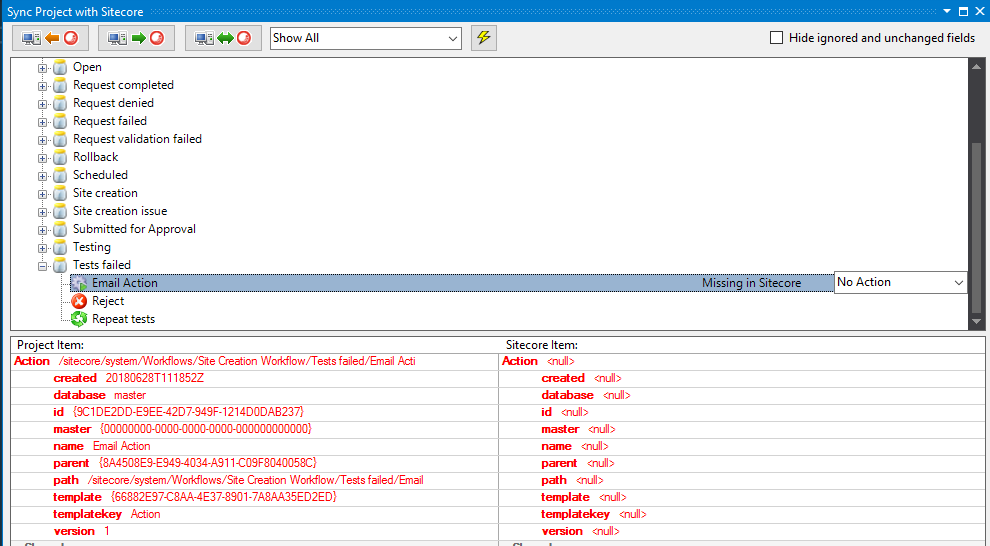
  1. Attempt to sync TDS with Sitecore and make note of all the items that have the error.  In my example, I'm only showing a single line, but you may have many. (as I did before I took this screenshot)

    TDS Sync View
  2. Open the .item file in a text editor.
  3. Take note of the template type of the item and create a new item in Sitecore with the same type. (making sure to create the item with the same name/path as in the item file)
  4. Copy the relevant fields from the .item file and paste them into the proper fields in your new Sitecore item.  In my case, I have an "Action" template item and only care about "Type", "Parameters" and "Security" fields. (Note: You don't have to worry about every field, but you should take care to bring over the important fields to your application.  You can usually ignore fields like "_sortorder", "__owner", "__created", etc.)

    Item View
  5. Save your Sitecore item.
  6. Sync your TDS item to Sitecore from Visual Studio.

Your error is now gone and you can continue on your way.  As mentioned, this can become an extremely tedious process depending on how many items and how many fields you have on your items, but in my case, was a necessary evil. Someone smarter than me could probably develop a script of some kind to address the error on a larger scale, but I'll leave that to the aforementioned smarter people.

References:

Deploying Sitecore Items with Git and TDS (Hans Léautaud from 2014): https://medium.com/sitecore-tips-tricks/deploying-sitecore-items-with-git-and-tds-f6a47605d1b4

Hedgehog TDS - Field Content Does Not Match Content-Length (Corey Smith from 2016): https://www.coreysmith.co/hedgehog-tds-field-content-does-not-match-content-length/

September 10, 2019

Sitecore Roles PaaS Solr Connectivity

By: Craig Taylor
September 10, 2019


Sitecore Roles PaaS Solr Connectivity

Here's a quick one for everyone.  I recently provisioned a full Sitecore XP 9.0.1 environment in Azure PaaS.  The only exception to this is a VM that is running Solr.  I was getting a lot of errors in Application Insights about xConnect not being able to connect to the Solr server.  I suspected that I was missing a hybrid connection somewhere, but wasn't sure which role was missing it.

I couldn't find a list from Sitecore's documentation of all the roles that need to access Solr.  I know that I could look for the "ContentSearch.Solr.ServiceBaseAddress" setting to find all references to my Solr server, so I downloaded all the config files from each Sitecore role and found the one I was missing (xConnect Search).  I added the hybrid connection to the Solr server to my xConnect Search App Service and was back to running with no exceptions again!

Note: The "ContentSearch.Solr.ServiceBaseAddress" setting was removed in Sitecore 9.0.2 and is now in the "solr.search" connection string.

For reference, here are the 5 roles that should be able to communicate with Solr:

  • Content Management
  • Content Delivery
  • Processing
  • Reporting
  • xConnect Search

April 12, 2019

Limit TreelistEx Selections to X Number of Items

By: Craig Taylor
April 12, 2019


Sitecore Item Limit

I recently had a requirement to limit the content author's ability to select items.  In this case, they were only allowed to select two items.  I love using "TreeListEx" and therefore selected that field type.  I knew that I could set validation on fields and went about looking for the built-in validator that would limit the number of selections. . . I didn't find it.

While I was surprised to not find this validator, I thought that surely, someone else smarter than me had mentioned it on the interwebs; I was not disappointed.  A quick search yielded a StackOverflow post about it that cited a blog post.  In summary, apply a Regex value to the "Validation" field of your field. (Add a helpful "ValidationText" message while you're at it.)

I dutifully copied and pasted the Regex expression into my field and was a little surprised to see an error message while testing the validator:

Sitecore Validation Error

Well, that didn't go as expected.  After a bit of Internet sleuthing on the error, I found that there might be a character (or "characters") in the string that needs to be escaped.  I simply changed "^({[^}]+}|?){0,2}$" to "^(\{[^}]+\}|\?){0,2}$" (included the escaping 'backslashes' before the curly brackets and question mark) and was on my way!


Sitecore Validation Working

Update: And of course as I'm finalizing the research for this post, I see that Ben *actually* did solve this and it can be seen in the screenshot he included, but the Regex text in his post didn't include the escape characters

November 27, 2018

Sitecore CD Hardening via Release Deployments

By: Craig Taylor
November 27, 2018


Sitecore CD Hardening via Release Deployments

Security hardening on your CD servers is an absolute must.  It should not be an afterthought and you should address it early so that you're not trying to cram it in just before go-live.

In the days before automated deployments, CD hardening would involve manually manipulating the IIS folder level permissions on each CD server in your environments. With automated deployments, we can make this much easier!

Which Sitecore Version are We Deploying?

Take note of which version of Sitecore you are working with.  Prior to Sitecore 8.2, Update 3, you are still limited to manipulating IIS folder level permissions.  You can also handle this with configuration, but that's outside the scope of this post.  With Sitecore 8.2, Update 3 and newer, we have the option of changing the forms authentication mode in order to secure the server.

Disable Forms Authentication

The simple way to disable access to your Sitecore interface is to change the authentication mode from "Forms" to "None" in your web.config:


Easy enough to do on each of your CD servers, right?  But we want to automate that with our deployments.

Azure Devops and Web.config Tranforms

Using a web.config transform, we can target the "authentication" node and change the value to "None." 

What about local development though? 

When developing locally, you can use the "Debug" solution configuration that lets the web.config use the "Forms" setting when developing locally. This is exactly how Sitecore ships out of the box.

Use the "Release" solution configuration to set a transform on that element to change it to a token value.  Note: This assumes you are using the "Release" configuration when building your solution in Azure Devops (was VSTS). 

Why a token value instead of just setting it to "None"? 

We are utilizing (mostly) clean deploys.  When deploying, we wipe the web root and install all of Sitecore and our custom code and configuration from scratch.  Additionally, we deploy the same set of files to every server.  Different values for the tokens are controlled via variables and variable groups in Azure Devops. We expect this token value to be replaced at the time the release is generated and deployed to our different environments.

Putting it Together

So, we have a Web.Release.config file in our solution that looks like this:


In Azure Devops, we have a Variable Group for our CM servers that has the same "#{AuthenticationMode}" token with a value of "Forms":

Sitecore CM Server Role Variables


Additionally, in Azure Devops, we have another Variable Group for our CD servers that has the "#{AuthenticationMode}" token with a value of "None":

Sitecore CD Server Role Variables


When the release is built, use the Replace Tokens task in your release definition to process all your config files and replace the tokens with values from your Azure Deveops Variables Library.

Summary

Security hardening is an important task that shouldn't be overlooked and shouldn't be pushed to the end of your development cycle.  Consider security early and keep yourself and your clients out of the news.

Additional Reading

Sitecore - Deny anonymous users access to a folder

Sitecore - Restrict access to the client

Visual Studio Marketplace - Replace Tokens Task

January 31, 2018

Craig Taylor Wins Sitecore "Most Valuable Professional" Award

By: Craig Taylor
January 31, 2018


Craig Taylor wins Sitecore Most Valuable Professional Award

Atlanta, GA — January, 31st, 2018 — Craig Taylor has been named a "Most Valuable Professional (MVP)" in the Technology category by Sitecore®, the global leader in experience management software. Craig was one of only 208 Technology MVPs worldwide to be named a Sitecore MVP this year.

Now it its 12th year, Sitecore's MVP program recognizes individual technology, strategy, and commerce advocates who share their Sitecore passion and expertise to offer positive customer experiences that drive business results. The Sitecore MVP Award recognizes the most active Sitecore experts from around the world who participate in online and offline communities to share their knowledge with other Sitecore partners and customers.

I'm truly honored that Sitecore recognized me as an MVP in the Sitecore community for the fifth straight year! I'm surrounded by some amazingly talented co-workers at Avanade and supported by an amazing Sitecore community. I feel like I'm in great company and am continually pressed to keep the high standards demonstrated by the other Sitecore MVPs. (Craig Taylor, Sitecore Architect, Avanade Inc.)

"The Sitecore MVP awards recognize and honor those individuals who make substantial contributions to our loyal community of partners and customers," said Pieter Brinkman, Sitecore Senior Director of Technical Marketing. "MVPs consistently set a standard of excellence by delivering technical chops, enthusiasm, and a commitment to giving back to the Sitecore community. They truly understand and deliver on the power of the Sitecore Experience Platform to create personalized brand experiences for their consumers, driving revenue and customer loyalty."

The Sitecore Experience Platform™ combines web content management, omnichannel digital delivery, insights into customer activity and engagement, and strategic digital marketing tools into a single, unified platform. Sitecore Experience Commerce™ 9, released in January 2018, is the only cloud-enabled platform that natively integrates content and commerce so brands can fully personalize and individualize the end-to-end shopping experience before, during, and after the transaction. Both platforms capture in real time every minute interaction—and intention—that customers and prospects have with a brand across digital and offline channels. The result is that Sitecore customers are able to use the platform to engage with prospects and customers in a highly personalized manner, earning long-term customer loyalty.

Craig is a five time Sitecore Technology MVP and is a skilled, senior IT professional with over sixteen years of professional experience in Web technologies. He is an expert in architecting and leading teams in delivering Sitecore CMS solutions. Craig has a consistent record of delivering successful software implementations that are on-time and on-budget.

More information can be found about the MVP Program on the Sitecore MVP site: http://www.sitecore.net/mvp

December 1, 2017

Errthing is Duplicated! (in the Sitecore content tree)

By: Craig Taylor
December 1, 2017


Errthing is Duplicated! (in the Sitecore content tree)

So many Sitecores!  I recently ran into something that I've never seen before.  After performing a build to my local server, I noticed that I was having trouble syncing portions of my content tree via TDS and Rocks.  After further investigation, I noted that every node was duplicated:

You get a content, you get a content, you get a content

No bueno.  The duplicated items had identical guids, so it's not like they were separate items.  This screenshot is from Rocks, but logging into Sitecore showed me the same thing. (8.2 Update 4, btw, but this probably applies to all versions of Sitecore)

I tried just about everything I could think of to resolve this.  No dice.  Off to the trusty Sitecore Slack channels for help!

Side note: The Sitecore community is awesome!  You've instantly got an army of Sitecore enthusiasts willing to help you through any roadblocks you may face.  At times it seems like there are so many places to keep track of, but when you need them, you're glad they're there.  How to connect with the community: https://sitecore.stackexchange.com/questions/1689/how-can-i-connect-with-the-sitecore-community

As I initially thought this might have something to do with TDS, I tried that channel first.  Using the suggestions by others on the channel I tried numerous IIS restarts, Visual Studio reboots, disabled the TDS item cache, removed TDS file caches and rebooted my VM.  None of these helped my situation.  I was starting to consider "nuclear" options where I would attach vanilla master database files and briefly considered "transferring items from web to master."  I was not looking forward to these options and am glad I didn't get to that point.

The Fix

Fellow Sitecore MVP Kamruz Jaman (@JammyKam) thought this sounded like a config issue.  Perhaps there were some config files were corrupt or duplicated, he thought.  He suggested disabling all custom configs to rule those out.  I wasn't sure what would have changed from earlier in the day when everything was working and to a bit later that evening, but I decided to delete all custom configs knowing that I could always just redeploy them.

Well, I deleted the custom config files and fired Sitecore back up (after an IISreset for good measure)  to check and sure enough, the duplication issue was resolved!

I still didn't have my application configs now, so I followed up with re-deploying my application.  Still worked, whew!

So What Busted Sitecore?

I actually haven't had a chance to get to the bottom of *exactly* which config broke Sitecore so hard.  I think there must have been a config that somehow got duplicated (with a different name) or some cruft left over from a bad deploy that caused it to get wonky.  It was definitely not a TDS problem though, just to be clear! ;) I'm just glad the solution was relatively easy.


Sitecore 9 to the Rescue!

Well, 9 isn't the solution to my duplication problem, but it would have been much, much easier if I were already on 9 and could disable an entire configuration layer via the "mode=Off" setting as our hero of this story, Kamruz documents here:
https://jammykam.wordpress.com/2017/10/17/rules-based-configuration/

June 15, 2017

Suppress Cookies for EU Cookie Compliance

By: Craig Taylor
June 15, 2017


Suppress Cookies for EU Cookie Compliance


You've probably seen this already on a number of sites, but increasingly, sites are being required to inform their visitors of the site's cookie policies.  Many implementations that I've seen provide the disclaimer that cookies are being used and that by interacting with the site, the user is providing consent.  My client is going a step further and requires that *no* cookies (except the ASP.NET session cookie) be written to the browser before the user provides consent.

In the case of this client's site, this includes Sitecore's analytics tracking cookie, Sitecore's language cookie (although technically okay to emit because it's only a session cookie) and a host of other tracking cookies emitted from different renderings.

In order to approach this in a way that prevents the need to edit logic across the solution, we came up with a solution that has two primary components:

  1. A Cookie Consent Provider - This provider allows us to interface with a third party system for determining if consent is required, not required or has already been provided.  Additionally, by implementing a provider, we can easily switch out to another provider at some point in the future and not have to re-write logic.  
  2. An MVC filter - By creating an MVC filter that checks for consent, we can simply decorate methods in our controllers to control the emitting of code/cookies without having to affect any logic already contained in those methods.
I'll talk a bit about the primary components and then describe how they all work together to actually suppress the cookies.

Cookie Consent Provider

The provider is based on the standard Microsoft provider model.  I create a base class that all providers will inherit from.  In the base class, I have methods to get and set the user's consent to use cookies.

I won't review the details of my provider implementation but know that it's pretty vanilla with a provider that implements the base class along with the necessary configuration elements in code and the web.config.

MVC Filter

I chose to use an "AuthorizeAttribute" filter to allow me to suppress the execution of controller methods.  The authorize attribute returns a simple "true" or "false" value indicating if the calling method has the required permissions to execute.

The two primary areas to concern ourselves with in the filter are the "AuthorizeCore" and "HandleUnauthorizedRequest" methods.

In "AuthorizeCore", we are checking the need for consent.  It returns a bool value indicating if the current request can be executed.  Also note a bit of tricky logic there regarding the "InvertLogic" parameter.  Basically, I have times when I need to execute the calling method when the result of the "AuthorizeCore" check is false.  By passing in this parameter, I can invert the logic to return the desired results.  In my case, I want to execute a controller rendering that outputs my cookie consent banner when consent is required.  I can just decorate my method with the additional parameter:


In "HandleUnauthorizedRequest" (the code that is executed when "AuthorizeCore" returns "false") we are setting an AuthorizationContext Result.  In my case, we wanted to output an HTML comment that indicates the calling method along with the status so that we could easily confirm that the system is functioning normally when we view the source of the page.

Putting it Together 

As mentioned, the goal here is to suppress cookies from being emitted before the user has given consent.  The two Sitecore-specific cookies that I am blocking are the 'analytics' and 'lang' cookies.  I block these by inserting pipeline processors that check my consent provider.

Note: Always use patch include files and refrain from editing the Sitecore.config file directly.  

It's also worth noting that I have a configurable 'AnalyticsCookiePrefix' parameter that I pass into the "SuppressAnalyticsCookie" processor.  If the cookie name ever changes in the future, we can edit the value in config and not have to touch the code.

In those processors, I make a call to the consent provider to see if I need to suppress the cookies or not.  If I do, I search the current Response and remove the cookies.  If consent has already been provided on a previous request, the code is skipped.

Note: Via Sitecore.Stackexchange, it was recommended that I not disable the Tracker.  I disabled it anyways, because even though it might be legit to have the cookie written on the first load per EU specifications, my client's requirement was that it was not to be written at all until consent is provided.  Additionally, I wanted to avoid editing the web.config file so instead of utilizing the HTTP module method, I wrote a pipeline processor.  (Yeah, I know I edited the web.config with the consent provider . . . )

So the processors take care of the Sitecore-specific cookies that are written.  For any controller methods that end up writing scripts that emit cookies, I simply decorate the method with my Authorize Attribute override and no further code changes are required!

Additional Resources


Ways to block SC_ANALYTICS_GLOBAL_COOKIE from being deployed - Sitecore.stackexchange.com

How to Write a Provider Model

MVC Filters

May 4, 2017

Help! No one can log in!

By: Craig Taylor
May 4, 2017

No one can log into Sitecore; Sitecore Domain deleted.

Oh snap.  It's Friday afternoon at the end of a long week and you get a desperate email from the client indicating that none of the logins for the Sitecore CM server work any longer.  Guess I'll put down the beer from the office kegerator and go look at things. :/

First up: Confirm the CD servers are still running/displaying the site.  Check.

Next: Is the CM server up?  Check; I can see the Sitecore login screen.

Next: Attempt to log into the CM with my admin account: Hmm, not able to log in.

Next: RDP into the CM server to see what's going on.  Able to RDP fine.

Next: Look at the logs.  Come across something interesting/scary:


Err, that doesn't look good.  Someone logged into Sitecore using an admin account and managed to delete the Sitecore domain.  You know, the one that *all* the logins are associated with. . .   So now, no one can log in.

Fortunately, the users themselves are not deleted when a domain is deleted. (https://doc.sitecore.net/sitecore_experience_platform/setting_up_and_maintaining/security_and_administration/users_roles_and_domains/create_and_edit_a_security_domain#_Delete_a_domain)

Before we get into how to solve this, let's talk about a couple of security issues here.

One: It looks like users that clearly don't know what they are doing have access to an admin account where they can do very bad things.  I think it should be a extremely rare exception where a content author needs this level of access.  It takes longer to properly configure security so that content authors can do everything they need to do but don't have access to portions of Sitecore that they don't need, but that's how it should be done.  Sometimes you can't avoid this and have to create some admin accounts for users, but as the logs show us, we don't even know where to point the finger since a 'generic' admin account was used.

Two: DO NOT GIVE CREDENTIALS TO GENERIC ADMIN ACCOUNTS!  If a user 'needs' admin access, make the account tied to that user an admin.  This would at least let us see who made the boo-boo.

Okay, let's solve this.

Restoring last night's database backup could be an option.  (Checks with Devops)  "Oh, the database backup process isn't running properly and we have no backups?  Super."  Side note: Well, at least we found that out now and can fix that.

Somehow hacking in to the database to restore whatever was deleted could be an option.  Hmm, I'm not sure I even want to go there.

Recall that there is a "Domains.config" file in the "App_Config\Security" folder and that the error specifically mentioned modifying it, there might be something there. . . .

After comparing the modified file to a stock Sitecore Domains.config file, it was easy to see that the only thing missing was the line that declared the "sitecore" domain:

I added that line back in and poof!: Everyone can log in again.  A much easier solve than I would have thought for something that appeared to be very scary.

Next step: IMMEDIATELY change the generic admin account credentials and let the users know that they can log in again.

Now, back to that beer. . .

TL;DR: Put the "sitecore" domain declaration back into the "Domains.config" file, drink beer.

February 28, 2017

Sitecore Server Switch

By: Craig Taylor
February 28, 2017

Sitecore Server Switch

One of the most time-consuming aspects of installing and configuring Sitecore is configuring the servers for their specific roles.  Per Sitecore documentation, specific configuration files should be enabled or disabled for a Content Management (CM) server and likewise, specific files should be enabled or disabled for Content Delivery (CD) server.  Failing to configure the servers for their roles can cause Sitecore to not perform as expected.

Note: There are additional roles for server configurations such as Processing, Reporting and Publishing.

Sitecore's ARM templates look to solve this problem in that they can quickly spin up and configure a Sitecore server, but this only works when using Azure PAAS.  For those not using Azure PAAS, manually adjusting the configuration files can be time consuming.

Sitecore Server Switch looks to solve this issue by using PowerShell.  After installing Sitecore on a server, you can run the "Sitecore_Switch_CM_CD_Lucene_Solr.ps1" script to configure a server as a CM server, as a CD server and additionally configure it to utilize either Lucene or Solr indexing.

Sitecore Server Switch currently supports Sitecore 8.0 (all versions) and Sitecore 8.2 Update 2.  More versions are coming soon.

Sources

Sitecore Server Switch GitHub Source
Sitecore Server Switch on the Sitecore Marketplace (coming soon!)

Acknowledgments

Big shout-out to Sarkis Einarsson for his PowerShell scripts that were the base of this project. (http://sitecoreunleashed.blogspot.com/2015/09/sitecore-8-toggle-cd-configuration.html)

Additional Reading

You can also take this to the next level and automate everything.  Check out Patrick Perrone's work into this space with his automation scripts.

Update (03/01/2017)

And of course, how it usually happens, after writing this module and post, I came across this site that has some automation scripts for 8.2 and even includes the ability to configure additional roles: https://bitbucket.org/sitecoreautomationteam/sitecore-automation/wiki/sitecore-environment
Note: I have not tested this.

And I've also been made aware of Michael West's PowerShell scripts as well: https://gist.github.com/michaellwest/d1124a459cb1fb47486f87d488ecfab8